Already collected votes using paper ballots, surveys, or another method?
Use RCV123 as a ranked choice voting calculator by uploading your vote data to get instant tabulated results with charts and round-by-round breakdowns.
Collect votes your way → Format in spreadsheet → Upload → Get instant results
Want to collect votes using Google Classroom or Google Forms instead? Click here
Quick Steps:
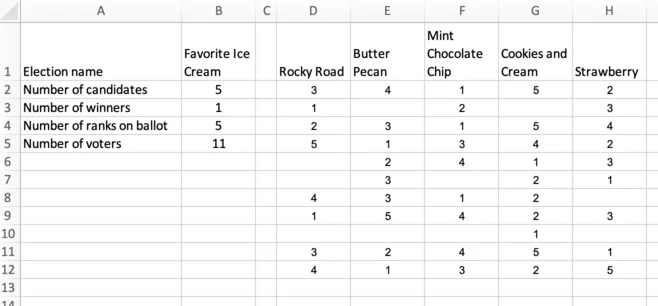
- Format your votes in Microsoft Excel or Google Sheets using the sample below as a guide.
- Upload your spreadsheet: paste a Google Sheets link or upload an Excel file using the box below.
- Get instant RCV results with charts and round-by-round breakdowns.
Here is a sample spreadsheet which is formatted correctly:Sample Spreadsheet on Google Sheets
Click the link to view the spreadsheet in a separate tab and see how the data should be formatted.
Sign in to upload voting data
Before uploading a file, please sign in using a free account.
Formatting Example for Microsoft Excel or Google Sheets.
Accepting additional votes: After uploading your spreadsheet, you can accept additional online votes if needed. Simply click
Open voting from your Dashboard or Preview ballot page, then use
Edit ballot options to configure how voters will access the ballot.